Multiple companies and TallyVault encryption in TallyBook
Many owners keep more than one set of books: a trading firm and a proprietor's consultancy, a business in two states with two GST registrations, or the books of a family member's shop. Since version 0.2.0 TallyBook keeps each of these as a separate company, and since 0.1.5 the TallyVault password really encrypts a company's data. This guide covers both, with the limits stated plainly.
When does a business need a separate company?
A company in TallyBook is a complete, separate set of books: its own ledgers, stock, vouchers, financial year and reports. As a rule of thumb:
| Situation | Usually |
|---|---|
| A different legal entity (another proprietorship, partnership firm or private limited company) | Separate company |
| A separate GST registration (GSTIN), for example a branch in another state | Separate company, so GSTR-1 and GSTR-3B are prepared per GSTIN |
| A shop and a godown, or two departments, under the same GSTIN | One company, with godowns or cost centres |
| Practice or training data | A separate company you can delete or ignore |
If you are unsure, ask your CA how they want the books split before you start entering.
The company keys
| Key | What it does |
|---|---|
| F3 | Change company: shuts the one you are in and opens another |
| Alt+F3 | Company Info: Select, Shut, Create, Alter, Change TallyVault |
| Ctrl+F3 | Shut the current company |
If you press any of these with a voucher on screen that you have not saved, TallyBook asks before discarding it. When TallyBook starts, it shows Select Company so you choose which books to open.
Create a second company
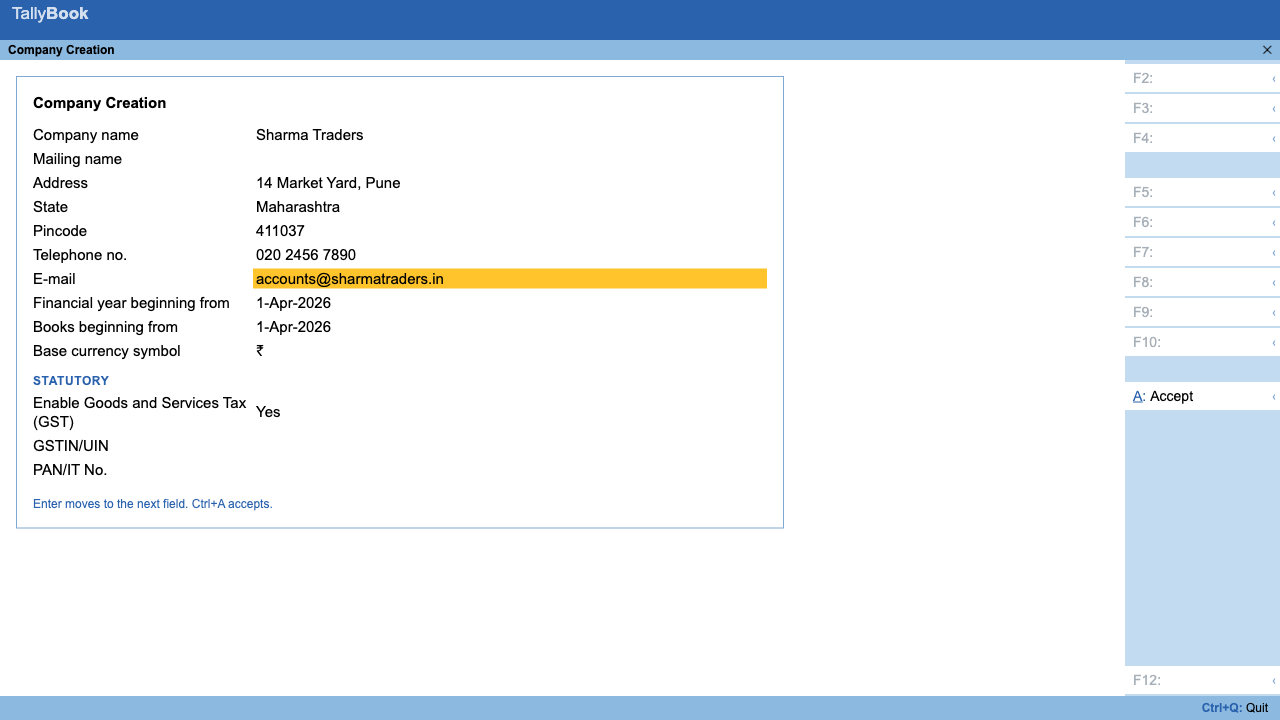
- Press Alt+F3 and choose Create.
- Fill in the company name, address, state, financial year and books beginning date. Turn on GST and enter the GSTIN if the business is registered.
- Press Ctrl+A to accept. The new company opens with the standard groups, ready for ledgers.
- Press F11 to turn on the features this business needs (inventory, payroll, TDS and so on). Features are set per company.
Upgrading from an earlier version? Your existing data opens as the first company. It is not moved or copied, so there is nothing to migrate.
How companies are stored
Each company has its own data file on your computer and its own TallyVault. A backup (Alt+Y → Backup) is taken for the company that is open, so back up each company separately. See backup, restore and data safety.
TallyVault: what it does now
A TallyVault password encrypts the company's data on disk. Without the password the data file is unreadable, even if someone copies it off the computer. Backups of that company are encrypted too. In the desktop app the encryption uses SQLCipher, a widely used encrypted database format.
- Open the company and press Alt+K → Company Security.
- In the TallyVault section, type the password twice and accept. You can also reach it with Alt+F3 → Change TallyVault.
- Shut and reopen the company: TallyBook asks for the TallyVault password first.
- Take a fresh backup, so your latest backup is protected by the same password.
The same screen changes or removes the password. Each company's TallyVault is separate, so you can protect only the companies that need it.
TallyVault or user passwords?
| TallyVault password | Users and passwords (Security Control) | |
|---|---|---|
| Protects against | Someone copying the data file or a backup | Someone at the keyboard doing more than their role allows |
| Encrypts data | Yes, data and backups | No |
| Who knows it | The owner | Each user has their own |
| If forgotten | Cannot be recovered | The administrator can reset other users |
Most businesses with staff use both. See users, roles and passwords.
Limits today
- Only one company is open at a time. TallyPrime can load several together; in TallyBook you switch with F3.
- No group companies (consolidated reports across companies) and no split company yet.
- TallyBook is single-user: one person works in a company on one computer at a time.
Frequently asked questions
Can I open two companies at the same time?
No. TallyBook opens one company at a time. Press F3 to change company or Alt+F3 for Company Info.
I forgot my TallyVault password. Can it be reset?
No. A lost TallyVault password cannot be recovered by you or by Techardent Labs, and the company and its encrypted backups cannot be opened without it. Keep the password written down somewhere safe.
Are backups encrypted too?
Yes. Backups of a company with a TallyVault password are encrypted. Take a fresh backup after you set or change the password.
I upgraded from an older version. Where is my data?
Your existing data opens as the first company. It is not moved, so nothing needs to be migrated.
Does TallyVault replace users and passwords?
No. TallyVault encrypts the data file and backups; users and roles control what each person at the keyboard may do. Many businesses use both.
Related: Backup and restore · Users, roles and passwords
TallyBook is an independent product made by Techardent Labs and is not affiliated with, endorsed by or connected to Tally Solutions Pvt. Ltd. TallyPrime and Tally are trademarks of their owner. Tax rules change often; confirm current rates, limits and due dates on the official portals or with your Chartered Accountant.