How to read a Balance Sheet and Profit & Loss account: a guide for owners
Your CA prepares them every year and the bank asks for them with every loan application, yet many owners only look at the last line. These two statements, read properly, tell you whether the business is profitable, where the money is stuck and how much you owe. Here is how to read them, using a sample shop and the TallyBook screens.
Where to find them in TallyBook
- Gateway of Tally › Balance Sheet (B)
- Gateway of Tally › Profit & Loss A/c (P)
- Or press Alt+G and type the name.
Both use the current period shown at the top right of the screen. Press Alt+F2 to change it, for example to 1-Apr-2025 to 31-Mar-2026 for a full financial year.
The Profit & Loss account
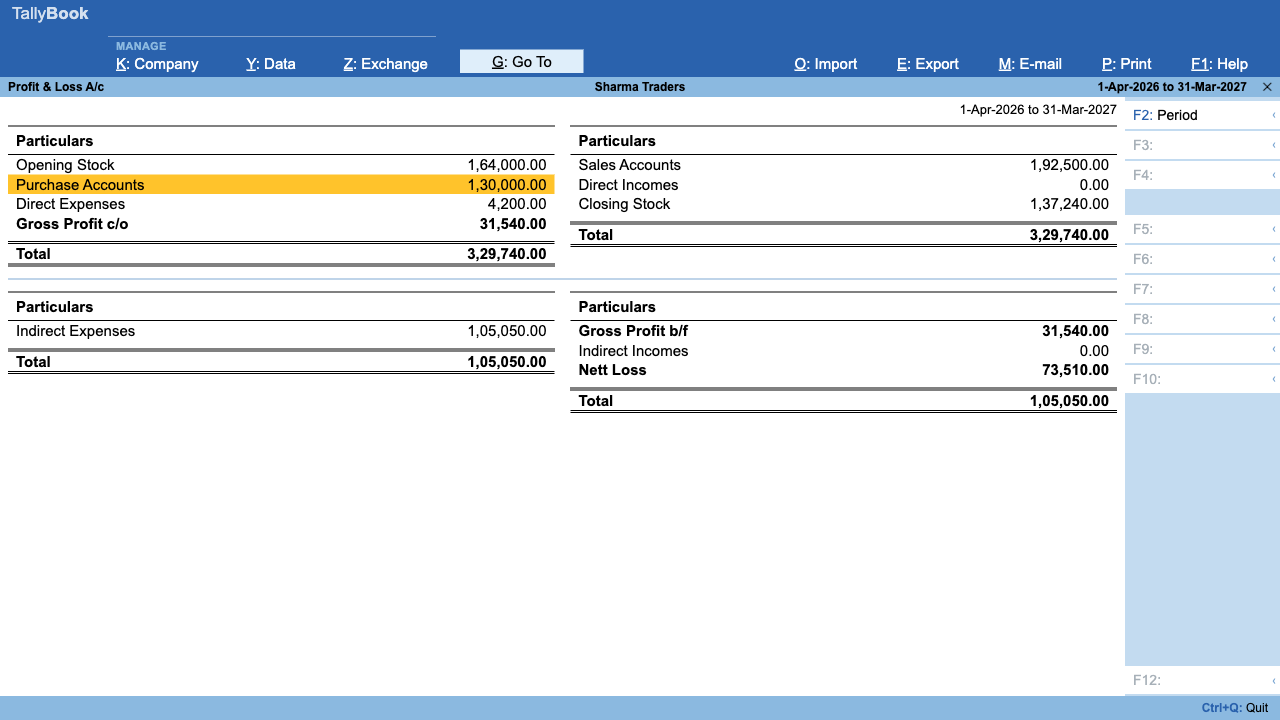
TallyBook shows the P&L in the traditional two-sided format, in two parts.
Part 1: trading (gross profit)
| Left side | ₹ | Right side | ₹ |
|---|---|---|---|
| Opening Stock | 50,000 | Sales Accounts | 8,00,000 |
| Purchase Accounts | 6,00,000 | Direct Incomes | 0 |
| Direct Expenses (freight inward) | 20,000 | Closing Stock | 70,000 |
| Gross Profit c/o | 2,00,000 | ||
| Total | 8,70,000 | Total | 8,70,000 |
Gross profit is what you earn from buying and selling before any running costs: sales plus closing stock, minus opening stock, purchases and direct expenses. Opening and Closing Stock appear only when you keep inventory in TallyBook.
Part 2: net profit
| Left side | ₹ | Right side | ₹ |
|---|---|---|---|
| Indirect Expenses (rent, salary, power) | 1,20,000 | Gross Profit b/f | 2,00,000 |
| Nett Profit | 85,000 | Indirect Incomes (interest) | 5,000 |
| Total | 2,05,000 | Total | 2,05,000 |
Net profit is what is left after every running expense. If expenses are larger, the line reads Nett Loss on the right instead.
The Balance Sheet
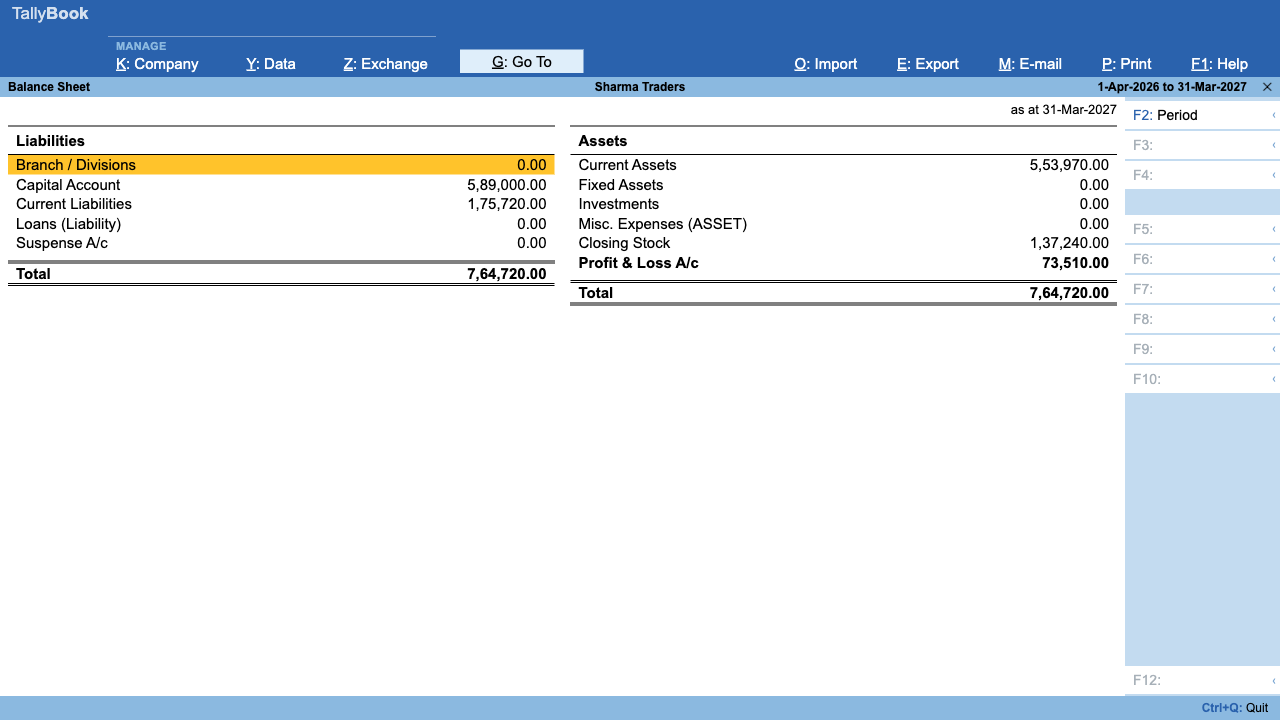
The Balance Sheet is a photograph of the business on the last day of the period, “as at 31-Mar-2026”. The left side shows where the money came from; the right side shows where it is now.
| Liabilities | ₹ | Assets | ₹ |
|---|---|---|---|
| Capital Account | 3,00,000 | Fixed Assets | 1,50,000 |
| Loans (Liability) | 1,00,000 | Current Assets | 3,60,000 |
| Current Liabilities | 95,000 | Closing Stock | 70,000 |
| Profit & Loss A/c | 85,000 | ||
| Total | 5,80,000 | Total | 5,80,000 |
Reading it line by line:
- Capital Account is the owner's money in the business.
- Loans (Liability) is borrowed money: bank loans, overdrafts and unsecured loans.
- Current Liabilities is what you owe in the short term: suppliers (Sundry Creditors), GST and TDS payable (Duties & Taxes) and provisions.
- Profit & Loss A/c is this period's net profit, carried over from the P&L. That is how the two statements connect.
- Fixed Assets are things you keep and use: furniture, computers, vehicles.
- Current Assets turn into cash within a year: customers who owe you (Sundry Debtors), bank and cash balances, deposits and advances.
- Closing Stock is the value of goods on hand, shown when you keep inventory.
Drilling down with Enter
- Open the Balance Sheet and use the Up and Down arrow keys to highlight a group, for example Current Assets.
- Press Enter. TallyBook opens the Group Summary for that group, listing its sub-groups and ledgers.
- In the Group Summary, press Alt+F1 for the detailed view, which expands every sub-group down to ledgers.
- Highlight a ledger such as Sundry Debtors › Ravi Enterprises and press Enter to see every voucher in that ledger.
- Press Enter on a voucher to open it. Press Esc to go back up one level at a time.
Five questions to ask your own statements
- Is gross profit as a share of sales stable? A falling margin means costs rose or prices fell.
- Are indirect expenses growing faster than sales?
- Are Sundry Debtors growing faster than sales? Customers are taking longer to pay; check Bills Receivable.
- Can current assets cover current liabilities? Display More Reports › Analysis & Verification › Ratio Analysis shows the current ratio.
- Is there a “Difference in Opening Balances” line? If so, fix your opening balances; see the Trial Balance guide.
For a full walkthrough of report keys, read F12, Alt+F1 and filters.
Frequently asked questions
Why is my net profit not the same as the cash in the bank?
Profit counts sales when they are made, not when customers pay, and ignores money borrowed or invested. Unpaid invoices, stock on the shelf, loan repayments and asset purchases all make cash differ from profit.
What does “Difference in Opening Balances” mean on my Balance Sheet?
The opening balances you entered for your ledgers do not add up to zero. TallyBook shows the gap so the Balance Sheet still totals. Correct the openings until the line disappears.
Can I see last year's Balance Sheet?
Yes. Press Alt+F2 and enter the period you want. The period applies to all reports until you change it again.
Is there a detailed (Alt+F1) view of the Balance Sheet?
Yes, since version 0.1.5. Press Alt+F1 on the Balance Sheet or Profit & Loss A/c for the detailed view. You can also press Enter on any group to open its Group Summary.
TallyBook is not affiliated with Tally Solutions Pvt. Ltd. TallyPrime is a trademark of its owner.