GST basics for small businesses: CGST, SGST, IGST and place of supply
Goods and Services Tax (GST) replaced most indirect taxes in India in 2017. For a small business owner, three things matter day to day: which tax heads to charge, how to read a GSTIN, and how “place of supply” decides between them. This guide covers those basics and shows how TallyBook applies them. It is an overview, not legal advice: rules change and have exceptions, so confirm anything that affects your filing on gst.gov.in, cbic-gst.gov.in or with your CA.
CGST, SGST and IGST
| Tax | Full name | Charged when | Goes to |
|---|---|---|---|
| CGST | Central GST | Supply within one state | Central government |
| SGST | State GST | Supply within one state (with CGST) | That state's government |
| IGST | Integrated GST | Supply from one state to another, and imports | Centre, later shared with the destination state |
Within a state, the rate is split in half: half CGST, half SGST. Between states the full rate is charged as IGST. In some union territories, UTGST takes the place of SGST.
The 18% rate above is only to show the arithmetic. Check the current rate for your goods or services on the official portals.
Place of supply in plain words
Place of supply is the state where the law treats a supply as happening. It is not always where the customer's office is, and not always where you are. As broad starting points:
- Goods that you send to a customer: usually where the movement of goods ends.
- Goods sold over the counter: usually your shop's location.
- Services to a registered business: usually the customer's registered location.
There are many special rules, for example for property-related services, events, transport, “bill to, ship to” deliveries and supplies to SEZ units. If a case is not obvious, check the place-of-supply provisions on the portal or ask your CA before you invoice. A wrong head (CGST + SGST instead of IGST) is a common and avoidable mistake.
How to read a GSTIN
A GSTIN has 15 characters. Using a made-up example, 27ABCDE1234F1Z0:
| Characters | Example | Meaning |
|---|---|---|
| 1–2 | 27 | State code (27 is Maharashtra) |
| 3–12 | ABCDE1234F | PAN of the business |
| 13 | 1 | Registration number for that PAN in that state |
| 14 | Z | Fixed letter Z in normal registrations |
| 15 | 0 | Check character calculated from the first 14 |
TallyBook checks every GSTIN you type: the pattern, that the state code exists, and the check character. On a party ledger it also checks that the first two digits match the State you selected, so “GSTIN state code does not match the State” warns you of a typo before it reaches your returns. This is an offline check; it does not confirm that the GSTIN is active, which you can do with the search tool on gst.gov.in.
How TallyBook decides the split
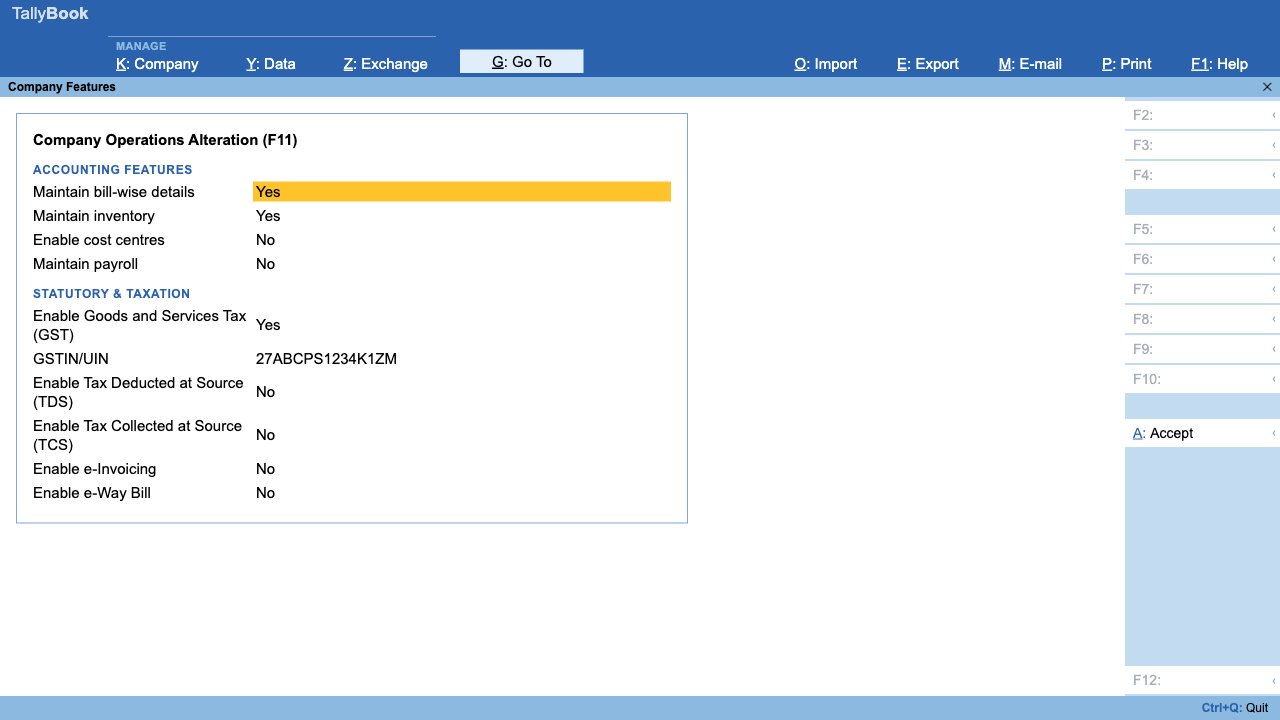
- Press F11, set Enable Goods and Services Tax (GST) to Yes and enter your company's GSTIN/UIN. Its first two digits become your company state.
- For each customer and supplier, set the State, the Registration type (Regular, Composition, Unregistered/Consumer and so on) and, if registered, the GSTIN.
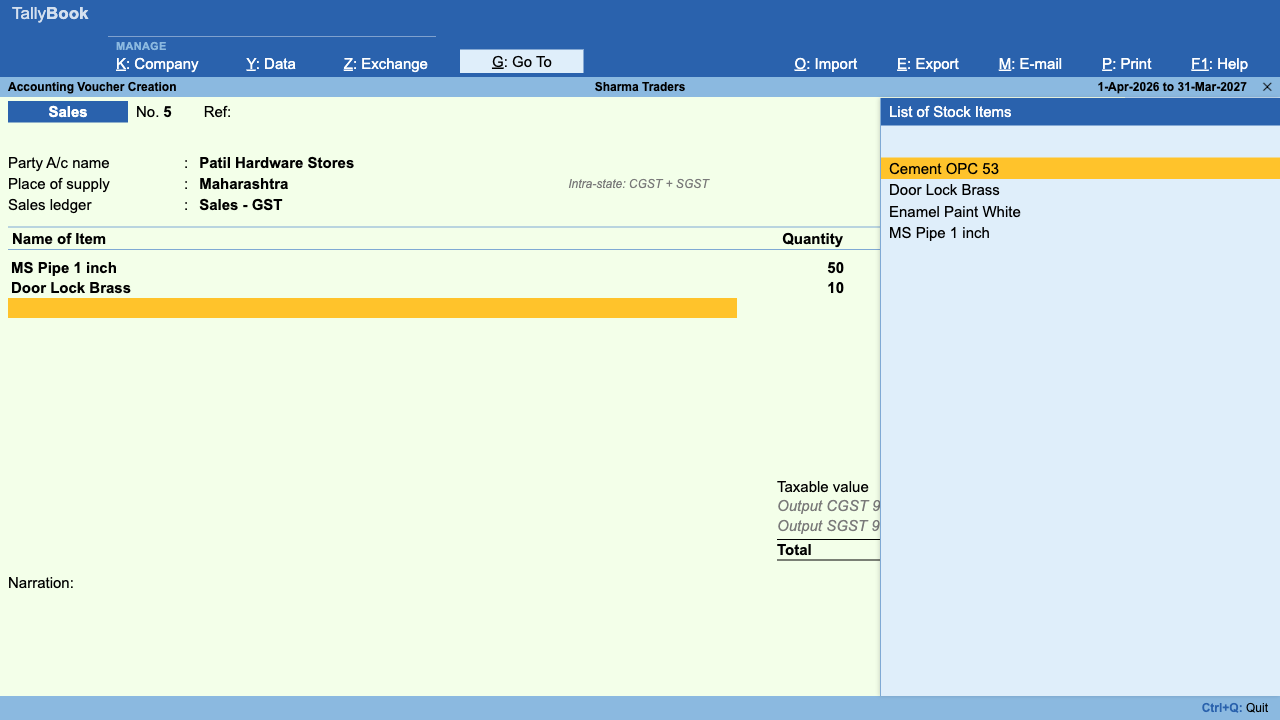
- On a Sales or Purchase invoice, TallyBook takes the Place of supply you choose on the invoice; if you leave it, it uses the party's GSTIN state, then the party's State.
- If the place of supply equals your company state, TallyBook posts half the tax to CGST and half to SGST. Otherwise it posts the full tax to IGST.
- It creates the tax ledgers under Duties & Taxes the first time they are needed, named by direction, head and rate, such as “Output CGST” or “Input IGST” followed by the rate.
What else TallyBook does with GST
The same invoice data feeds the statutory reports under Display More Reports › Statutory Reports: GSTR-1, GSTR-3B, GSTR-2B reconciliation, HSN/SAC Summary and Tax Analysis. TallyBook prepares these for you to review and upload on the GST portal; it does not file returns itself. Read creating a GST invoice and GSTR-1 and GSTR-3B with TallyBook next, and see groups and ledgers for where tax ledgers belong.
Frequently asked questions
Is the total tax higher on an interstate sale?
No. For the same goods at the same rate, IGST equals CGST plus SGST. Only the split, and which government receives the tax, changes.
What place of supply does TallyBook use if I leave it blank?
It uses the state in the party's GSTIN, then the State on the party ledger, then your company's own state. If none is available you see “Place of supply could not be determined; set the party state”.
Can I sell to an unregistered customer?
Yes. Set the party's Registration type to Unregistered/Consumer and leave GSTIN blank. Set the party's State so the place of supply is right.
Which GST rates can I select in TallyBook?
The rate list has 0, 0.25, 3, 5, 18 and 40%, which applies from 22 September 2025, plus 12% and 28% for invoices dated before that change. Rates are revised from time to time, so check the current rate for your goods or services on the official portals before invoicing.
TallyBook is not affiliated with Tally Solutions Pvt. Ltd. TallyPrime is a trademark of its owner.