Preparing GSTR-1 and GSTR-3B with TallyBook
Every sales and purchase voucher you enter in TallyBook carries its GST details: party, GSTIN, place of supply, rate and tax heads. The GST reports simply read those vouchers for the period you choose. There is no separate data entry for returns, which also means a wrong invoice shows up wrong in the return, so it pays to review before you upload.
Where to find the reports
With GST on, go to Gateway → Display More Reports → Statutory Reports. You will see GSTR-1, GSTR-3B, GSTR-2B Reconciliation, HSN/SAC Summary and Tax Analysis (and e-Invoice and e-Way Bill if they are enabled in F11). GSTR-1 and GSTR-3B are also in Alt+G Go To.
GSTR-1: outward supplies
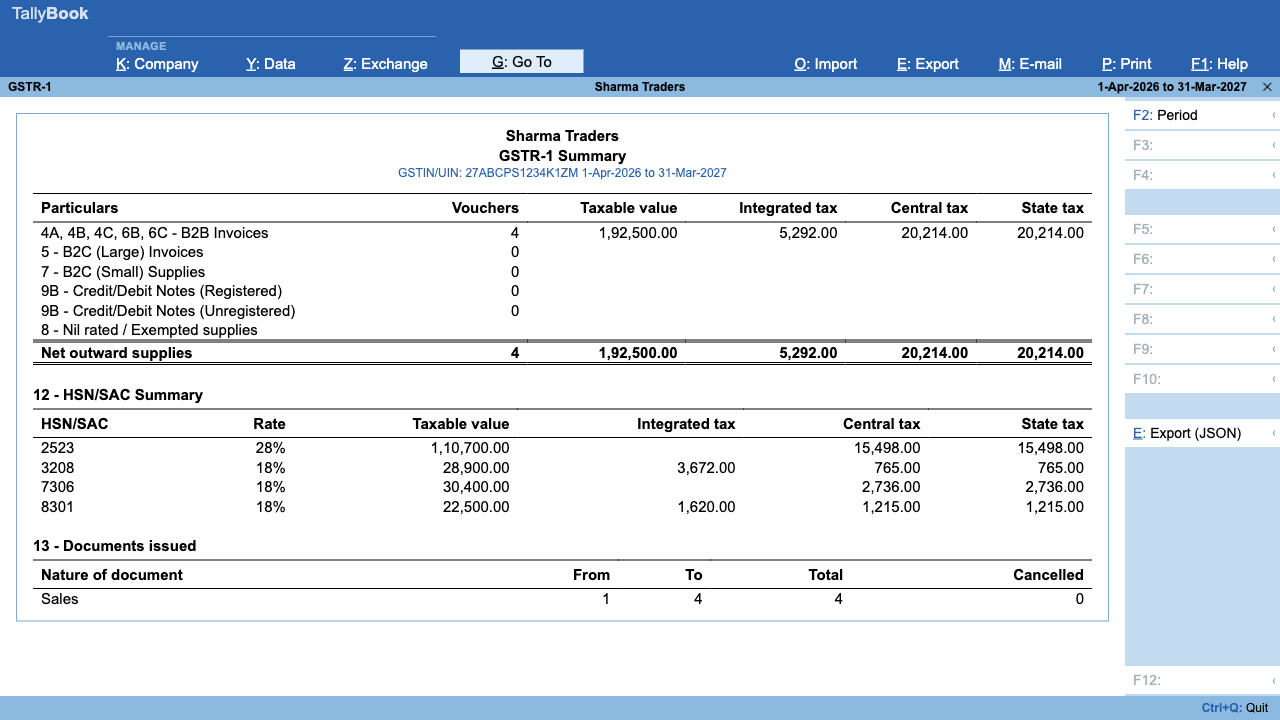
Press Alt+F2 to pick the month (or a quarter). The summary is grouped the way the return is:
| Section in TallyBook | What goes there |
|---|---|
| 4A, 4B, 4C, 6B, 6C – B2B Invoices | Sales to registered customers |
| 5 – B2C (Large) Invoices | Large inter-state sales to unregistered customers |
| 7 – B2C (Small) Supplies | Other sales to unregistered customers |
| 9B – Credit/Debit Notes | Registered and unregistered notes, shown separately |
| 8 – Nil rated / Exempted | Nil, exempt and zero-rated supplies |
| 12 – HSN/SAC Summary | Taxable value and tax by HSN and rate |
| 13 – Documents issued | Number ranges, totals and cancelled vouchers |
If any line in the HSN table shows "(not set)", add the HSN/SAC on the sales ledger or stock item and the report updates at once. When everything looks right, press Alt+E. TallyBook saves a file named like GSTR1_2026-10.json.
GSTR-3B: the monthly summary
GSTR-3B shows 3.1 outward supplies (taxable, nil/exempt) and inward supplies liable to reverse charge, 4 eligible input tax credit from your purchase entries, and 6.1 payment of tax: tax payable, how much is paid through each kind of ITC, tax payable in cash and ITC carried forward. TallyBook applies the set-off order shown on screen (IGST credit first, then CGST and SGST credit). There is no file export for GSTR-3B; you type the figures on the portal.
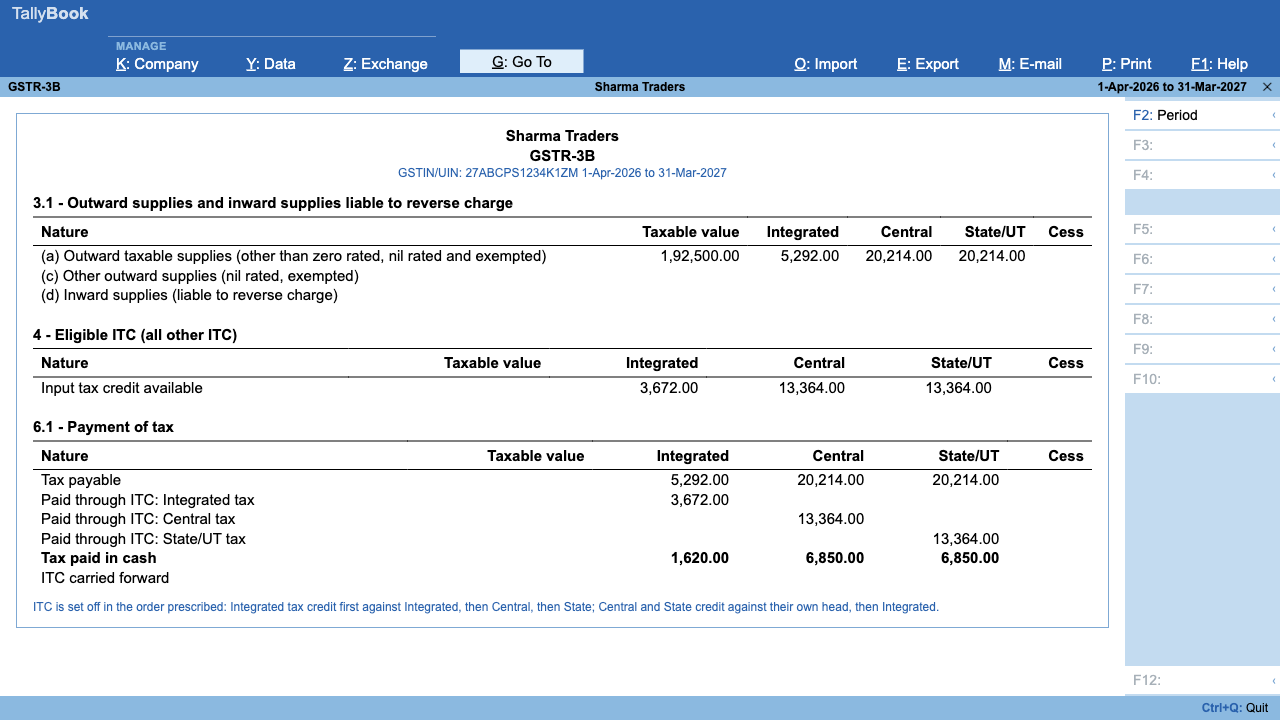
The ITC shown is what your books say. Whether every rupee is claimable depends on the rules for your business, so compare it with GSTR-2B and discuss any doubt with your CA.
GSTR-2B reconciliation
- Download your GSTR-2B for the month as JSON from gst.gov.in.
- Open GSTR-2B Reconciliation, set the period and press Alt+I to import the file.
- Each document gets a status: Reconciled, Mismatched, Potential Match, Available Only in Books or Available Only in Portal. Ctrl+B cycles through the statuses, Ctrl+F filters by party or number.
- Press Enter on a row to open the purchase voucher and correct it, or follow up with the supplier for invoices only in the portal.
HSN/SAC Summary and Tax Analysis
The separate HSN/SAC Summary report gives the same HSN breakdown for any period, with an F12 option to show inward supplies too. Tax Analysis shows voucher count, taxable value and each tax head by GST rate, which helps when a figure in the return looks off.
Before you file: a quick checklist
- Day Book for the month shows every invoice, with no missing numbers (check Documents issued).
- Every customer with a GSTIN has Registration type Regular (or SEZ and so on), not Unregistered.
- No "(not set)" lines in the HSN summary.
- GSTR-2B reconciliation has no unexplained mismatches.
- Take a backup with Alt+Y → Backup, so you can always go back to the filed position.
Frequently asked questions
Can TallyBook file GST returns directly on the portal?
No. TallyBook prepares the reports and the GSTR-1 JSON file. You upload, verify and file on the GST portal yourself.
Will the GSTR-1 JSON be accepted by the portal?
It is built in the portal's JSON layout, but formats change. Upload it, check the portal summary and any errors, and match totals with TallyBook before you submit.
Can I prepare a quarterly GSTR-1?
Yes. Set any period with Alt+F2, such as a full quarter, and the report and export cover that period.
Where do I check GST due dates and rates?
On gst.gov.in or with your CA. TallyBook does not show due dates.
Why is my ITC in GSTR-3B different from GSTR-2B?
GSTR-3B in TallyBook shows ITC from your purchase entries. Use GSTR-2B Reconciliation to find invoices missing on either side.
Related: Create a GST invoice · e-Invoice and e-Way Bill
TallyBook is an independent product made by Techardent Labs and is not affiliated with, endorsed by or connected to Tally Solutions Pvt. Ltd. TallyPrime and Tally are trademarks of their owner. Tax rules change often; confirm current rates, limits and due dates on the official portals or with your Chartered Accountant.