Groups and ledgers explained: the 28 predefined groups and which one to choose
Before you record a single voucher, you need somewhere to post it. In Tally-style accounting that place is a ledger, and every ledger lives inside a group. Choosing the right group is the most important decision you make when setting up a company, because the group decides where the amount shows up in your final accounts.
Ledger vs group
- A ledger is a single account: “Ravi Enterprises”, “HDFC Bank Current A/c”, “Shop Rent”. Vouchers post to ledgers.
- A group collects similar ledgers: all customers go under Sundry Debtors, all bank accounts under Bank Accounts. Reports add up ledgers group by group.
Groups can sit inside other groups. A group at the top level is a primary group; one placed under another group is a sub-group. Each primary group has a nature (Assets, Liabilities, Income or Expense), and its sub-groups inherit it.
The 28 predefined groups
When you create a company, TallyBook sets up the same 28 groups a Tally user expects: 15 primary groups and 13 sub-groups. It also creates two ledgers for you, Cash (under Cash-in-Hand) and Profit & Loss A/c.
| Primary group | Nature | Predefined sub-groups |
|---|---|---|
| Capital Account | Liabilities | Reserves & Surplus |
| Loans (Liability) | Liabilities | Bank OD A/c, Secured Loans, Unsecured Loans |
| Current Liabilities | Liabilities | Duties & Taxes, Provisions, Sundry Creditors |
| Branch / Divisions | Liabilities | None |
| Suspense A/c | Liabilities | None |
| Fixed Assets | Assets | None |
| Investments | Assets | None |
| Current Assets | Assets | Bank Accounts, Cash-in-Hand, Deposits (Asset), Loans & Advances (Asset), Stock-in-Hand, Sundry Debtors |
| Misc. Expenses (ASSET) | Assets | None |
| Sales Accounts | Income | None |
| Direct Incomes | Income | None |
| Indirect Incomes | Income | None |
| Purchase Accounts | Expense | None |
| Direct Expenses | Expense | None |
| Indirect Expenses | Expense | None |
Sales Accounts, Purchase Accounts, Direct Incomes and Direct Expenses affect gross profit and appear in the upper (trading) part of the Profit & Loss A/c. Indirect Incomes and Indirect Expenses appear below the gross profit line. The asset and liability groups go to the Balance Sheet.
Which group should I choose? A lookup table
| Ledger | Group |
|---|---|
| Owner's or partners' capital | Capital Account |
| Current or savings account at a bank | Bank Accounts |
| Overdraft or cash credit account | Bank OD A/c |
| Customers | Sundry Debtors |
| Suppliers | Sundry Creditors |
| Sales (local, interstate, exports) | Sales Accounts |
| Purchases | Purchase Accounts |
| CGST, SGST, IGST, cess, TDS payable | Duties & Taxes |
| Freight inward, carriage, factory wages | Direct Expenses |
| Rent, salary, electricity, phone, office expenses | Indirect Expenses |
| Interest received, discount received, commission received | Indirect Incomes |
| Furniture, computers, vehicles, machinery | Fixed Assets |
| Shares, mutual funds, long-term fixed deposits | Investments |
| Rent deposit, electricity deposit paid | Deposits (Asset) |
| Advance to staff, loan given to someone | Loans & Advances (Asset) |
| Term loan from a bank against security | Secured Loans |
| Loan from a friend or relative without security | Unsecured Loans |
| Expenses due but not yet paid (audit fee, salary payable) | Provisions |
| An amount you cannot identify yet | Suspense A/c (clear it before year end) |
Creating a ledger in TallyBook
- At the Gateway of Tally, press C for Create, then choose Ledger. You can also press Alt+G and type “Create Ledger”.
- Type the Name, and an alias if you want a short code.
- In Under, pick the group from the list, for example Sundry Debtors for a customer.
- For a customer or supplier, fill the extra fields that appear: bill-by-bill balances (when bill-wise details are on in F11), credit period, address, State and, if GST is enabled, the registration type and GSTIN. TallyBook checks the GSTIN format and that its first two digits match the State.
- Enter the Opening Balance and choose Dr or Cr, if the account already had a balance on your books beginning date.
- Press Ctrl+A to accept.
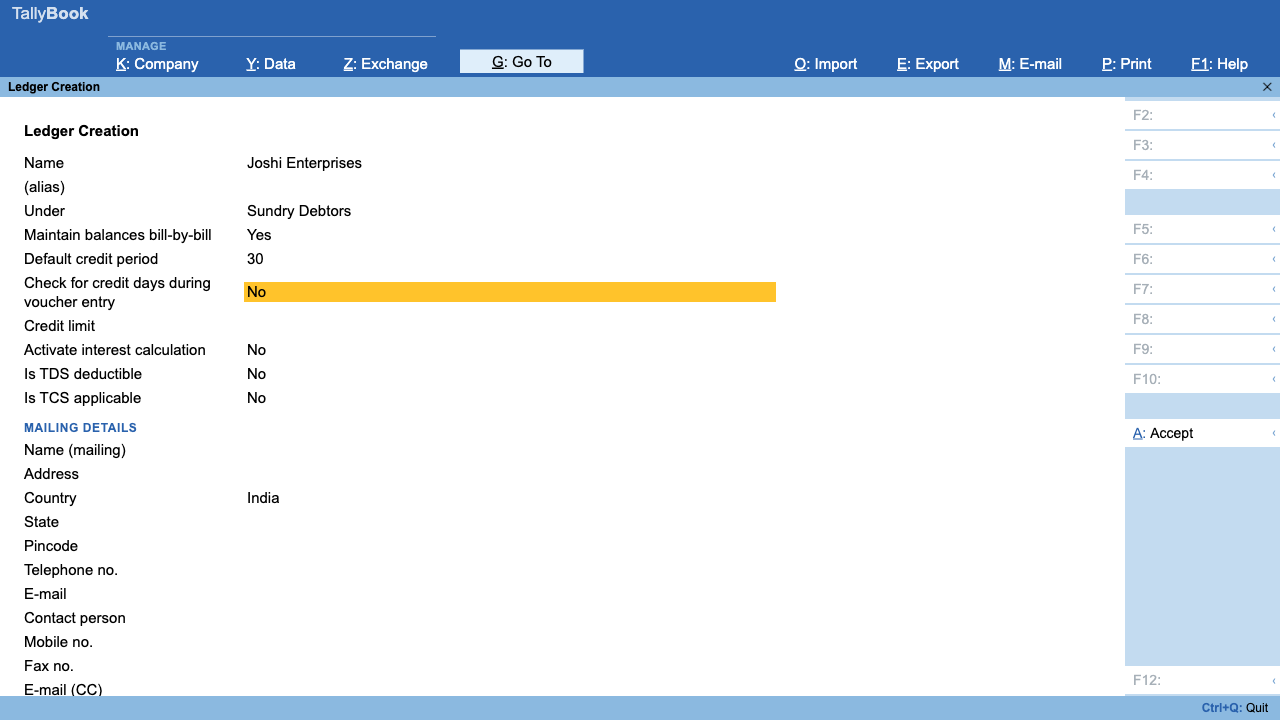
While entering a voucher you do not need to leave the screen: in any ledger list, press Alt+C to create the missing ledger and carry on. To see everything you have set up, open Chart of Accounts (H) from the Gateway.
A few safety rules apply: predefined groups and ledgers cannot be deleted, and a ledger that already has transactions cannot be deleted either. In this preview there is no Create/Alter Multiple screen, so ledgers are created one at a time, or in bulk through Excel import.
Next steps: learn the debit and credit rules, then see how these groups appear in the Balance Sheet and P&L.
Frequently asked questions
Can I create my own groups?
Yes. Go to Gateway of Tally › Create › Group. A new group can sit under an existing group, or be a primary group, in which case you must choose its nature (Assets, Liabilities, Income or Expense).
Can I delete a predefined group?
No, predefined groups cannot be deleted. Your own groups can be deleted only when they have no sub-groups and no ledgers under them. Keep the predefined names unchanged too: TallyBook uses them to decide, for example, which ledgers get bill-wise and GST fields.
I put a ledger under the wrong group. Can I fix it?
Yes. Open Alter › Ledger, change the Under field and accept. Past vouchers stay as they are and simply report under the new group. The predefined Cash and Profit & Loss A/c ledgers cannot change group.
Should rent deposit go under Indirect Expenses?
No. A refundable deposit is money you will get back, so it is an asset: put it under Deposits (Asset). Only the monthly rent itself is an expense.
TallyBook is not affiliated with Tally Solutions Pvt. Ltd. TallyPrime is a trademark of its owner.